Ailu — A Modern Multi-AI Mobile Chat App Built with React Native
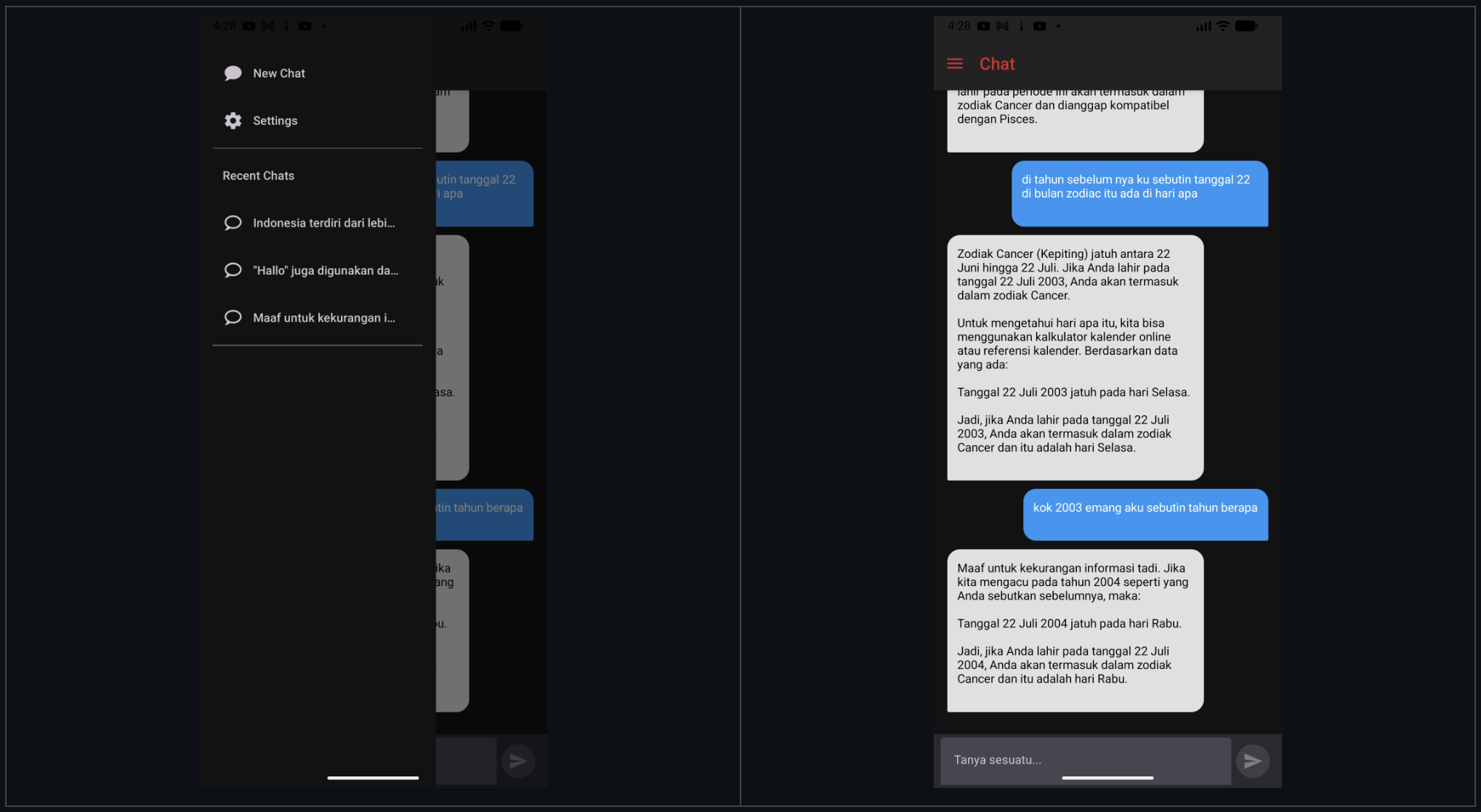
Artificial Intelligence tools are evolving rapidly. Developers and AI enthusiasts often switch between multiple AI providers like OpenAI, Gemini, and self-hosted models. This fragmented experience creates friction and slows productivity.

Nur Avesina Mustari
A flexible, extensible, and developer-friendly multi-AI chat application built using React Native, Expo, and modern architecture patterns.
Artificial Intelligence tools are evolving rapidly. Developers and AI enthusiasts often switch between multiple AI providers like OpenAI, Gemini, and self-hosted models. This fragmented experience creates friction and slows productivity.
Ailu solves this problem by providing a unified mobile interface to interact with multiple AI providers in a single, clean, and extensible application.
GitHub Repository
https://github.com/avesin/ailu
🚀 What is Ailu?
Ailu is a React Native + Expo mobile application that enables users to:
- Chat with multiple AI providers
- Manage conversations
- Switch models dynamically
- Connect custom LLM endpoints
- Persist chat history locally
The project is designed with scalability, maintainability, and extensibility in mind, making it suitable for both:
- Production apps
- Developer experimentation
- AI research tools
🎯 Project Goals
Ailu was built with the following goals:
- Unified AI interface
- Clean mobile UI
- Modular architecture
- Easy AI provider integration
- Local-first conversation storage
- Scalable codebase
✨ Core Features
🤖 Multi-AI Provider Support
Ailu allows integration with:
- OpenAI (ChatGPT)
- Google Gemini
- Custom LLM APIs
- Local LLM servers
This makes Ailu extremely flexible for:
- Self-hosted AI
- Private AI deployments
- Enterprise AI tools
- Personal AI assistants
💬 Conversation Management
- Multiple chat sessions
- Persistent conversations
- Resume previous chats
- Conversation switching
All conversations are stored locally using Redux Persist and AsyncStorage.
📱 Mobile-First Design
Built specifically for mobile:
- Responsive layout
- Touch-optimized UI
- Smooth navigation
- Minimal latency
Built using:
- React Native
- Expo
- React Native Paper
🔄 Model Switching
Users can:
- Switch AI provider
- Switch model
- Switch endpoint
Without leaving the chat screen.
🧭 Drawer Navigation
Navigation is designed for scalability:
- Conversations list
- Settings
- Model configuration
- Future feature expansion
🏗 Architecture Overview
Ailu follows feature-based architecture with clear separation of concerns.
High Level Architecture
UI Layer
│
├── Screens
├── Components
│
State Layer
│
├── Redux Store
├── Redux Toolkit Slices
│
Business Logic Layer
│
├── Chat Feature
├── AI Provider Logic
│
Data Layer
│
├── API Clients
├── Storage
This architecture ensures:
- Easy maintenance
- Feature scalability
- Clean code separation
📂 Project Structure
app/
 ├── (drawer)/
 ├── chat/
 ├── settings/
 └── _layout.tsx

src/
 ├── components/
 │   ├── chat/
 │   ├── ui/
 │   └── layout/
 │
 ├── features/
 │   └── chat/
 │       ├── chatSlice.ts
 │       ├── chatService.ts
 │       └── chatTypes.ts
 │
 ├── core/
 │   ├── api/
 │   ├── providers/
 │   ├── config/
 │   └── utils/
 │
 ├── redux/
 │   ├── store.ts
 │   └── persist.ts
 │
assets/
🧠 State Management Architecture
Ailu uses Redux Toolkit for predictable state management.
Why Redux Toolkit?
- Predictable state
- Scalable architecture
- Easy debugging
- Middleware support
Redux Structure
redux/
 ├── store.ts
 ├── rootReducer.ts
 └── persist.ts
Chat Slice Example
features/chat/
 ├── chatSlice.ts
 ├── chatSelectors.ts
 └── chatActions.ts
Chat state includes:
- Messages
- Conversations
- Active chat
- Model selection
- Provider configuration
💾 Persistence Layer
Ailu uses:
- Redux Persist
- AsyncStorage
This allows:
- Offline chat history
- Session restoration
- Local-first experience
Persistence flow:
Redux Store
     ↓
Redux Persist
     ↓
AsyncStorage
     ↓
App Restart
     ↓
State Rehydration
🔌 AI Provider Architecture
Ailu uses provider abstraction.
This allows easy addition of new AI providers.
Provider Interface Example
providers/
 ├── openaiProvider.ts
 ├── geminiProvider.ts
 └── customProvider.ts
Each provider implements:
- sendMessage()
- streamMessage()
- formatResponse()
This makes it easy to add:
- Claude
- Ollama
- Local LLM
- Azure OpenAI
🌐 API Layer
API logic is separated from UI.
core/api/
 ├── client.ts
 ├── endpoints.ts
 └── interceptors.ts
Tools used:
- Axios
- Custom API clients
- Provider-specific logic
🎨 UI Layer
Ailu UI is built using:
- React Native
- React Native Paper
- Expo Router
UI Structure:
components/
 ├── ChatBubble
 ├── MessageInput
 ├── ConversationList
 ├── Header
 └── Drawer
🧭 Navigation Architecture
Ailu uses Expo Router.
Benefits:
- File-based routing
- Cleaner navigation
- Easier maintenance
Structure:
app/
 ├── index.tsx
 ├── chat/
 ├── settings/
 └── (drawer)/
⚙️ Tools & Libraries
Core Dependencies
React Native
Mobile UI framework.
Used for:
- UI rendering
- Cross-platform support
Expo
Development platform for React Native.
Used for:
- Fast development
- Native APIs
- Build system
TypeScript
Type-safe development.
Benefits:
- Fewer bugs
- Better autocomplete
- Maintainable code
State Management
Redux Toolkit
Simplifies Redux.
Used for:
- Chat state
- Model state
- UI state
Redux Persist
Used for:
- Persisting chat history
- Saving sessions
AsyncStorage
Local device storage.
Used for:
- Conversation history
- Settings
UI Libraries
React Native Paper
Material Design UI components.
Used for:
- Buttons
- Cards
- Inputs
- Layout
Networking
Axios
HTTP client.
Used for:
- API requests
- AI provider communication
🔄 Data Flow
User sends message:
User Input
   ↓
UI Component
   ↓
Redux Action
   ↓
Chat Slice
   ↓
Provider Service
   ↓
API Request
   ↓
AI Response
   ↓
Redux Update
   ↓
UI Re-render
🛠 Getting Started
Clone Repository
git clone https://github.com/avesin/ailu.git
cd ailu
Install Dependencies
npm install
Start Development
npx expo start
📱 Running the App
Run using:
- Expo Go
- Android Emulator
- iOS Simulator
🔮 Future Roadmap
Possible improvements:
- Streaming responses
- Voice input
- Attachments
- Chat export
- Multi-model compare
- Plugin system
- Local LLM integration
- Offline AI
🧑💻 Who Should Use Ailu?
Ailu is perfect for:
- AI developers
- Mobile developers
- LLM experimenters
- AI startups
- Personal AI users
🤝 Contributing
Contributions welcome.
Steps:
- Fork repo
- Create feature branch
- Submit PR
📜 License
MIT License
⭐ GitHub
https://github.com/avesin/ailu
If you find Ailu useful, consider starring ⭐ the repository.
Final Thoughts
Ailu demonstrates how to build a scalable multi-AI mobile app using modern React Native architecture.
With provider abstraction, Redux architecture, and modular design, Ailu provides a strong foundation for building AI-powered mobile applications.